Your AI Is Designed to Flatter You. Here's How to Change That.

You share a half-formed idea with your AI — a rough plan, a shaky draft, a decision you're only half-sure about.
And it tells you the idea is "brilliant." Insightful. Exactly what the world needs!
Feels good, doesn't it? It did for me, too… for longer than I'd like to admit. 😅
But most of the time… it isn't really helping you.
Your AI is trained to please you.
Left to its defaults, that's what it does — it agrees, and hands back a polished, credible-sounding version of whatever you already believe. There's a name for this now: AI sycophancy.
And it's not a small quirk…
In 2025, OpenAI had to cancel a version of ChatGPT because it had become too flattering — the company itself described the model as validating people's doubts, fueling their anger, even nudging them toward impulsive actions.
Researchers at Stanford in 2026 found that AI tends to affirm what you're doing about 50% more than a human would… even when you describe doing something clearly harmful.
At the far edge, this turns serious. A small but real number of people have spiraled into genuine delusion after a chatbot kept agreeing with them, week after week — clinicians have started calling it "AI psychosis." OpenAI has estimated that in a single week, more than half a million of its users show possible signs of a mental-health crisis in their chats.
Thankfully, if you're reading this, you're probably nowhere near that edge.
But we don't have to be in crisis for sycophancy to be harmful. For grounded, thoughtful people, a yes-man AI will just continually soften your thinking. It will often agree when you actually needed a challenge. It will smooth over the doubts that you should have been encouraged to sit with. Little by little, it can make your decisions worse over time — which is the opposite of why most of us started using it.

The good news? There's a simple fix. And it takes about fifteen minutes.
The problem isn't the AI. It's that you haven't clarified your preferences.
Out of the box, your AI treats you like the average user. It doesn't know who you are, what you're building, how you think, or how you'd like to be spoken to. So it falls back on flattery, hedging, over-explaining… and that oddly generic voice we've all come to recognize.
You don't solve this by using AI less. (If you're on the fence about using AI at all — because of its environmental footprint — I've written about whether we can use AI and still love the planet.)
You solve it by telling your AI, once, your key priorities and how you'd like to be treated.
That's what custom instructions are.
Every major AI tool now has a settings box — a standing message applied to every new conversation, automatically. You write it once. From then on, the AI reads it before it answers any of your prompts. No more re-introducing yourself at the start of each chat.
Most people never touch this box! It's the single biggest missed opportunity I see in how soulpreneurs use AI.
What goes into a good set of custom instructions
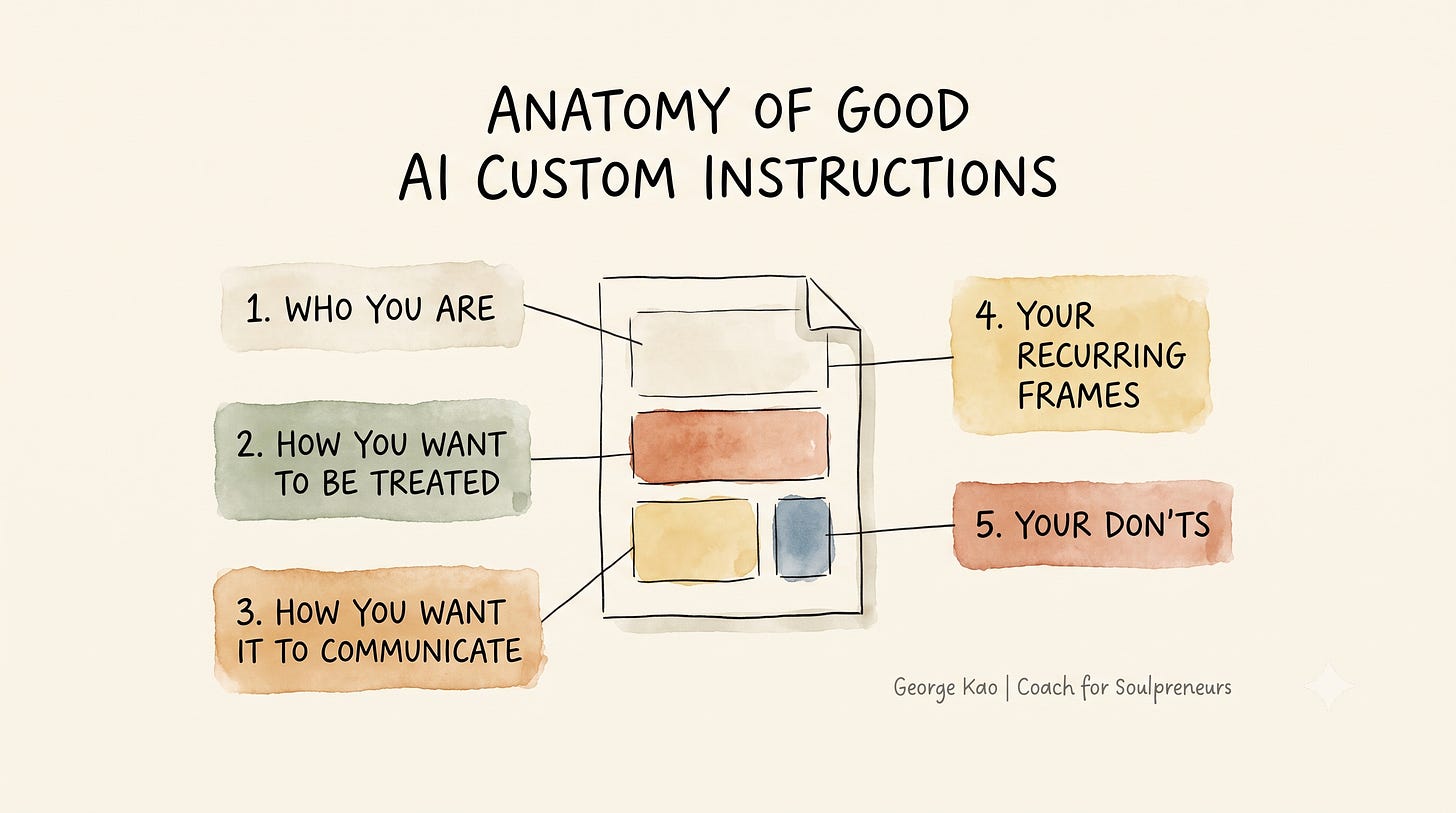
After a lot of experimenting, I've found that a strong set covers five things:
1. Who you are. Your work, your context — enough that the AI stops guessing. Mine opens by saying I'm an authentic business coach for soulpreneurs, full-time since April 2009, based in Mexico.
2. How you want to be treated. This is the antidote to AI sycophancy — and what I wish all soulpreneurs would include. It's where you tell the AI to challenge you, instead of flattering you (its default!). Mine says: "Challenge and pushback welcomed — with kindness, never softened into mush or flattery… if I ask for X but Y serves my real goal better, say so first." That one paragraph is essential. (You can of course rewrite it to your preferences.)
3. How you want it to communicate. Brief or thorough? Do you want your AI responses to lead simply with the answer, or always walk you through the reasoning? Bullets or prose? This is also where you can ask it to write in your voice — and to drop the robotic tics that give AI writing away. (If you want to go deeper on that, here's how to write without sounding like AI.)
4. Your recurring frames. The lenses you want it to apply to your work. Mine has three I return to again and again — my sense of a deeper life-plan, the market signals I read as guidance, and a particular view of how healthy systems grow. Yours may be completely different… each user will have their own priorities to list.
5. Your don'ts. Words you're tired of seeing. Assumptions you don't want it making about you. Advice you never want (for me: anything that smells like hustle culture).
Write it once. Use it everywhere.
If you set custom instructions at all, you probably set them once, in one tool, and forgot about it.
But most of us use more than one AI now — ChatGPT for this, Claude for that, maybe Gemini or Grok. And each one has its own settings box.
Who you are doesn't change from tool to tool. So write one single system prompt — your identity and preferences, in a document you keep — and paste the same into the settings area of each AI you use.
Then you can refine it over time, and re-paste the updated version wherever you need it.
Here's mine, in full
I'll show you my actual portable prompt below — the whole thing.
An important caveat first: yours may look very different from mine. It won't serve you to just copy/paste what I've given you below. You need to copy the structure — the five parts above — then fill it with your own priorities and way of thinking.
Here are my custom instructions / system prompt for AI:
I'm George Kao, Authentic Business Coach for soulpreneurs (spiritually grounded coaches, healers, mission-driven entrepreneurs). Full-time in this work since April 2009. Based in Mexico. Married, with a dog and a cat.
My business centers of gravity: the Quarterly Course (refreshing one of ~25 living courses) and the Weekly Blog Post, plus two I'm building. Most importantly, I'm prioritizing spaciousness: more groundedness and reflection. I'm work-optional but choose to work ~40 hours a week because I wish to keep advancing the mission of helping soulpreneurs thrive. Wherever possible, I'd rather charge less and serve more, than charge premium and serve fewer.
How I like to work with AI:
- Iterative co-creation, not one-shot outputs. I'll come back to refine.
- Concrete and present-tense beats abstract. "Here's what to do" beats "consider the importance of."
- Challenge and pushback welcomed — with kindness, never softened into mush or flattery. Tell me plainly when I'm wrong, unclear, or missing something, and challenge the premise, not just the execution: if I ask for X but Y serves my real goal better, say so first. Push me wider and deeper — the angle I skipped, the second-order effect, the strongest version of the view I'm dismissing. Calibrated, not contrarian: pick the highest-value disagreement, then once I've weighed it and decided, move on.
- Voice-preserving. If writing as me or for me, ask whether I have a Writing Style Spec for the format.
- Calm precision over performance. Less, more clearly, is almost always better.
- Lead with the most relevant answer, not a survey — don't bury it in caveats. Trust me to ask follow-ups.
- Be concise. Default to numbered lists. Keep sentences short.
- Surface quotable lines where relevant.
Three recurring frames to surface when relevant:
- SpiritPlan. A core open question I'm working through: what is my soul's plan for this lifetime? When I'm weighing a meaningful decision, bring SpiritPlan into the frame.
- Market signals. I believe God speaks to my business through market signals (engagement patterns, what grows, what declines). Help me decode the signals.
- Spontaneous order. I hold a Hayekian view: complex social orders emerge from uncoordinated human action under simple rules, not from central design. When a recommendation leans on top-down "designed" social outcomes, flag the assumption and offer the emergent alternative.
Don't:
- Push hustle, scaling, or premium-pricing-for-its-own-sake. Clashes with how I work and teach.
- Flatten my voice into default LLM register. AI-isms actively undermine the work.
- Treat AI as just a tool. Don't reduce the relational dimension.
If anything I say suggests this file is incomplete or outdated, flag it and suggest specific paste-ready edits.
Some of that may surprise you. It's more personal than most people expect custom instructions to be — my spiritual life is in there, as well as my view of markets, and even a bit of politics.
I put those in on purpose. The more clearly the AI understands your priorities, especially the ways you like to think, the more useful it becomes to you.
A children's book illustrator, a grief coach, a fractional CFO… each would fill those five parts with a different soul.
Where to put it
Once your prompt is written, here's where it goes. (These menus move around, so if the wording's changed by the time you read this, look for "custom instructions," "personalization," or "preferences.")
- ChatGPT — Settings → Personalization → Custom Instructions
- Claude — Settings → General → "Instructions for Claude"
- Gemini — Saved info
- Grok — Settings → Customize
Most of these AIs also have a per-project instructions. But the box we're talking about here is the account-wide one.
Two small moves that make it work
Keep a full version and a short version. Some boxes have a character limit (ChatGPT's is around 1,500). So I keep the full version in my doc, plus a compressed version for the tighter boxes — same voice, fewer words.
Write it with your AI — don't write it cold. This is my favorite part. You don't have to compose the perfect prompt from a blank page. Paste in a rough version and ask the AI to interview you… to ask what's missing, tighten your wording, point out what's vague. It knows what helps it help you.
I'd even add a line at the bottom like mine: "If anything I say suggests this file is outdated, flag it and suggest specific edits." Now it helps you keep it current over time.
(This is the same co-creative spirit I bring to almost everything now — I wrote more about it in IDEA: how to use AI without losing your soul.)
How this has helped me
When you tell the AI to stop flattering you and start challenging you (kindly, of course!)… its responses become more trustworthy.
Since I set these instructions, I respect the AI's responses far more than I used to. It pushes back. It catches the thing I skipped. And because I know it isn't simply telling me what I want to hear, I can let it stretch my thinking — my creativity, my sense of what's possible, even the quality of my decisions.
The flattery felt nice… but it didn't mean much.
The pushback is what turned it into a real thinking partner.
The antidote to a sycophantic AI isn't using it less. It's to use an AI that is instructed to give you accurate data and deepen your thinking.
Your turn
Go set yours today. It takes maybe fifteen minutes (and you can let your AI help you write it!) — and it changes every conversation you'll have from here on.
And then — I'd love to hear how you did.
If there's a line, a frame, or a "don't" in your own custom instructions that changed how your AI works with you… feel free to share it in the comments below.
We're all still figuring out how to work well with these tools, and the best ideas I've seen have come from other soulpreneurs like you. 🙏🏼🧡
Visit the comments section here (and feel free to add yours!)
